
Come modificare il saldo del conto demo Tradovate
Ha esaurito il conto di pratica o vuole ripartire da una cifra tonda? Modificare il saldo del Suo conto demo Tradovate richiede circa trenta secondi, una volta che sa dove si trova il pulsante.
On This Page
Ha esaurito il conto di pratica? Vuole ripartire da una cifra tonda? Oppure sta dimensionando una strategia per adeguarla a un obiettivo di conto finanziato prima di rischiare capitale reale. Qualunque sia il motivo, modificare il saldo del Suo conto demo Tradovate richiede circa trenta secondi, una volta che sa dove si trova il pulsante. Ecco come fare, passo per passo.
Che cos'è il saldo del conto demo?
Il saldo del Suo conto demo (o «SIM») Tradovate è la liquidità e il capitale virtuali presenti nel Suo conto di pratica simulato. È il denaro con cui opera mentre impara la piattaforma, mette alla prova un'idea o si esercita con dimensioni in stile prop firm. Poiché nulla di tutto ciò è reale, Tradovate Le consente di impostare questa cifra da solo. Può aggiungere fondi dopo una sessione difficile, azzerare un drawdown o stabilire un importo iniziale preciso.
Per essere chiari: questo non equivale a avviare o reimpostare la prova demo gratuita. Qui modifica soltanto il saldo. Il periodo di prova rimane invariato.
Modificare il saldo demo in Tradovate: passo dopo passo
Apra Application Settings
Acceda alla piattaforma web di Tradovate e faccia clic sul pulsante Application Settings nell'angolo in alto a destra dello schermo. Se effettua la modifica dall'app web, questa si sincronizza automaticamente ovunque.

Apra la scheda Accounts e trovi il Suo conto demo
In Application Settings, faccia clic sulla scheda Accounts. Trovi nell'elenco il Suo conto Demo / SIM. È il conto simulato associato alla Sua sessione di pratica.
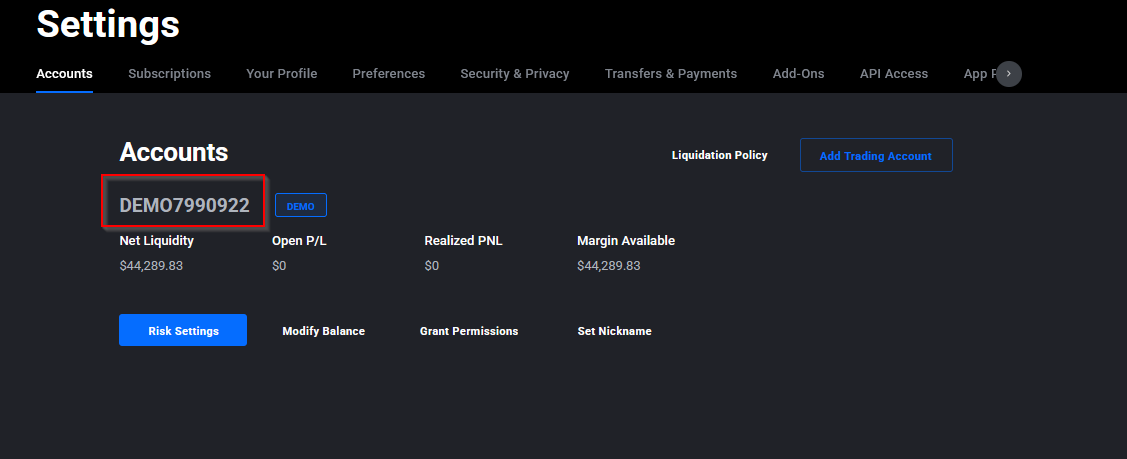
Un limite da conoscere: Tradovate fissa un tetto di 50.000 $ ai saldi demo, a meno che il Suo conto live non detenga tale importo o più. Questo limite può cambiare, quindi se conta su una cifra superiore, verifichi prima la regola attuale nel centro assistenza di Tradovate.
Perché potrebbe servirLe
- Ripartire dopo un drawdown: riporti il capitale del Suo SIM a un importo iniziale nuovo e continui a fare pratica.
- Replicare la dimensione di un conto finanziato: imposti il saldo in modo che corrisponda a una valutazione di una prop firm o a un conto obiettivo che intende operare.
- Mettere sotto stress il position sizing: aumenti o riduca il saldo per vedere come regge il Suo calcolo del rischio con dimensioni di conto diverse.
- Ripulire una sessione di pratica disordinata: elimini il capitale simulato gonfiato o negativo, così i Suoi report risultano finalmente chiari.
Automatizzi tutto con PickMyTrade
Una volta configurato il conto di pratica come desidera, PickMyTrade collega direttamente i Suoi alert di TradingView a Tradovate in modo che la Sua strategia si attivi da sola, senza clic manuali, sia su demo sia su live. Esegua prima la stessa identica automazione sul Suo conto SIM, poi la passi al Suo conto finanziato quando si fida.
Automatizzi i Suoi trade su Tradovate
Esegua prima la stessa automazione sul Suo conto SIM, poi la passi al live quando si fida. PickMyTrade collega direttamente i Suoi alert di TradingView a Tradovate.
Inizi la Sua prova gratuita di 7 giorniDomande frequenti
Di norma no. Tradovate limita i saldi demo a 50.000 $ o meno, a meno che il Suo conto live non detenga tale importo o più. Una regola di questo tipo può cambiare, quindi consulti le indicazioni aggiornate del centro assistenza di Tradovate se Le serve una cifra superiore.
Sì. Le modifiche al saldo effettuate nelle Application Settings dell'app web si sincronizzano su tutte le piattaforme Tradovate: Web, Desktop e Mobile.
No. Può modificare il saldo in qualsiasi momento, ma la prova simulata gratuita ha una durata limitata e non può essere prorogata una volta scaduta.
Questa guida ha esclusivamente finalità educative e informative e non costituisce consulenza finanziaria, di investimento o di trading. Il trading di futures e di altri prodotti a leva comporta un rischio sostanziale di perdita e non è adatto a tutti gli investitori. PickMyTrade è una piattaforma di automazione indipendente di terze parti e non è affiliata, approvata né sponsorizzata da Tradovate, Inc. «Tradovate» e tutti i nomi, loghi e marchi correlati sono di proprietà dei rispettivi titolari. Le funzionalità e i passaggi della piattaforma cambiano nel tempo: confermi sempre la procedura attuale nella piattaforma e nella documentazione ufficiali di Tradovate prima di agire.