
TradeDay FAQ: which accounts can you copy together?
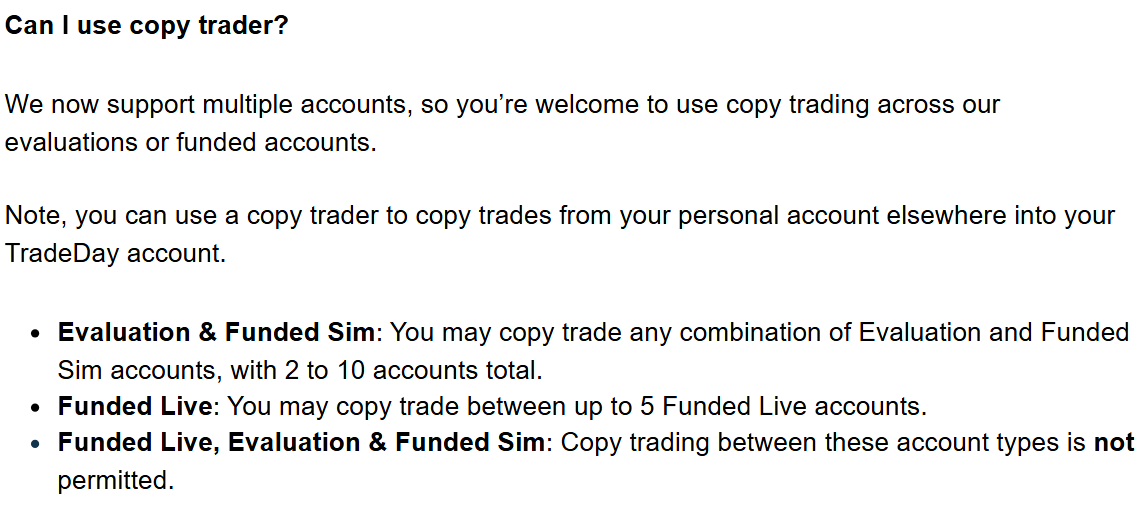
TradeDay allows copying between your own evaluations and Funded Sim accounts. A Funded Live account belongs in a separate group with other Funded Live accounts. A strategy that submits orders automatically has its own rules.
On This Page
Check the account label before you add a follower
TradeDay caps all stages at ten accounts in total. An account counts toward that total even if you keep it in a different copier group. Write down the stage shown for each account, including the leader.
Group your evaluation and Funded Sim accounts together. TradeDay allows two to ten accounts in that group, subject to its per-stage limits.
Keep Funded Live in a separate group of up to five live accounts. TradeDay also rules out simultaneous open positions across Live and Evaluation or Funded Sim accounts.
After a promotion, review the follower list before your next order. If a position is still open in the old group, check it directly in the trading platform.
If a TradingView alert will place the order
TradeDay accepts personally developed systems on supported platforms under its trading rules. Its automation guidance says traders do not receive direct Tradovate API access. Before using a cloud connection, ask TradeDay to confirm the exact PickMyTrade route for your stage. A successful sign-in only establishes that you signed in.
Sources
Automate your Tradovate trading
PickMyTrade routes your TradingView alerts to Tradovate and prop-firm accounts automatically.
Start your free trialFrequently asked questions
TradeDay permits your personal account to lead trades into an eligible TradeDay account. The stage and simultaneous-position restrictions still apply. Verify the other account provider’s rules too.
No. TradeDay requires you to manage these stages separately, even if you enter both trades by hand.
TradeDay prohibits third-party purchased algorithms. If you built the strategy yourself, check the execution platform and prohibited practices before connecting it.
Related guides
This guide is for educational purposes only and is not financial or trading advice. Futures trading carries a substantial risk of loss. PickMyTrade is an independent platform and is not affiliated with or endorsed by Tradovate. Platform steps change, so confirm them in the official documentation.