
Tradovate API 401 Live: Device ID Not Approved
Your bot authenticates fine and trades demo without a hitch, then every live order comes back 401 Access is denied. It's almost never a code bug, it's a missing device handshake that only live enforces.
On This Page
- What “Access Is Denied” Means
- Top Causes of a Live 401
- 1. You're still hitting the demo host
- 2. You're not sending a permanent deviceId
- 3. The device was never approved via the email link
- 4. You carried demo's accountId or accountSpec into live
- 5. The API key lacks order-write access
- How to Fix the Live 401: Step-by-Step
- Fixing a missing or non-permanent deviceId
- Approving the device via the emailed link
- Switching the host and re-pulling live account values
- Confirming API Access entitlement
- Troubleshooting Table
- Where PickMyTrade Fits
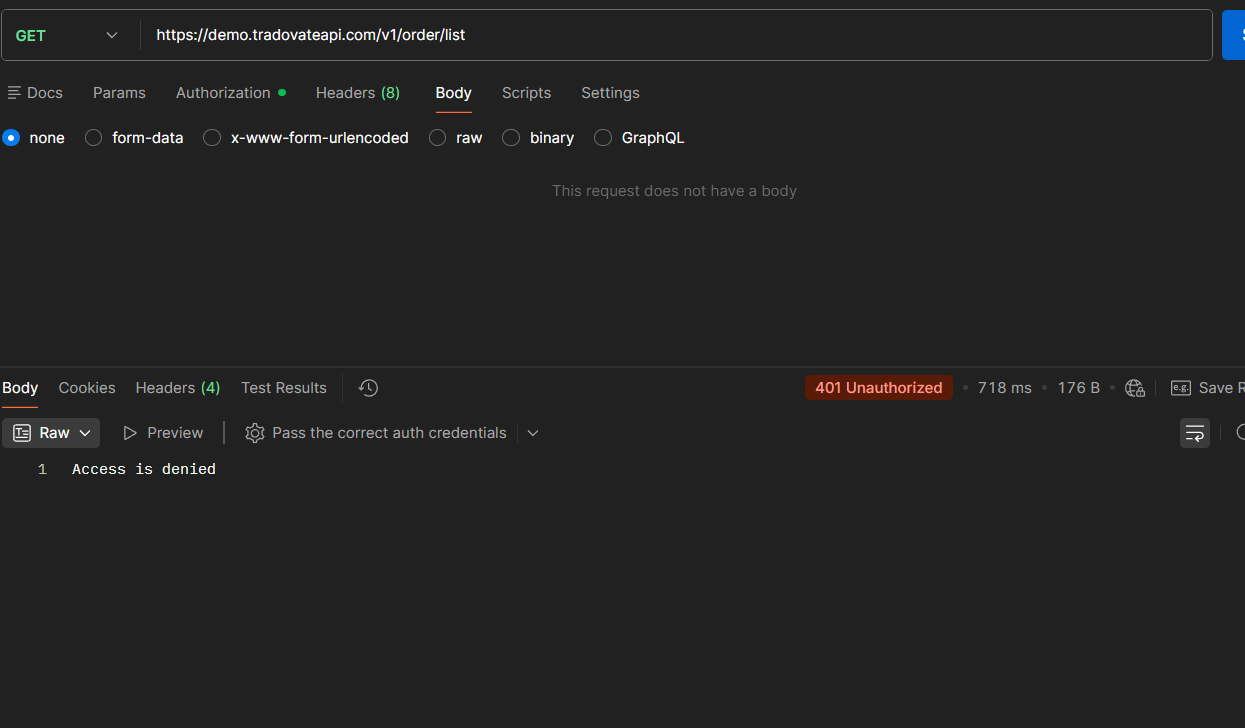
You wire up a Tradovate bot, watch it fire flawlessly against demo for days, then point it at your funded live account, and every order slams back a 401 with Access is denied. It's one of the most common walls API traders hit, and it's almost never a bug in your code. Live Tradovate enforces a rule that demo quietly ignores: every authentication request has to carry a permanent, verified deviceId, and that device has to be approved through an emailed link before it can route real orders. The error shows up in a couple of shapes, a flat 401 Access is denied, or a 200 response whose payload reads failureReason: UnknownReason, failureText: Access is denied, but the root cause is the same missing device handshake. Here's the full diagnosis and fix, plus how a bridge like PickMyTrade skips the device-approval dance entirely.
Quick Checklist for a Live-Only 401
- Point every call at the live host, use
https://live.tradovateapi.com/v1, neverdemo.tradovateapi.com, once you go live. - Send a permanent
deviceId, a stable UUID-style string you reuse on every login from that machine, not a fresh random value each time. - Approve the device, open the Tradovate device-approval email and confirm the link before you expect live orders to route.
- Re-pull your live
accountId, live and demo accounts carry differentaccountIdvalues; fetch the live one from/account/list. - Use the correct
accountSpec, the live form (e.g.Vxxxxx) differs from the demo form (DEMOxxxxx). - Confirm order-write entitlement, the API key needs full order access, not read-only market data.
What “Access Is Denied” Means
The Access is denied response is Tradovate telling you that the session or device making the request hasn't been authorized to act on a live account, even though your username, password, and API secret are all correct. That's why it's so confusing: the same credentials that authenticate cleanly and place orders in demo suddenly fail the second you switch to the live host.
You might see it as a clean HTTP 401, or, more misleadingly, as an HTTP 200 whose JSON body carries a failure payload like [{'s': 200, 'i': 3, 'd': {'failureReason': 'UnknownReason', 'failureText': 'Access is denied'}}]. Only live enforces verified device IDs. It's one of the very few differences between sim and live, and it's the primary reason 401s appear on live but never on sim. In other words, this is a two-factor / device-trust gate, not a broken order body.
Top Causes of a Live 401
1. You're still hitting the demo host
The most trivial cause: the base URL never got switched. Demo tokens and demo account IDs are worthless against the live endpoint, and vice versa. If you didn't change from demo.tradovateapi.com to live.tradovateapi.com, requests will fail for live accounts, plain and simple.
2. You're not sending a permanent deviceId
The deviceId is a string of up to 64 characters that's meant to uniquely and permanently identify the physical device making the request. Demo never checks it, so plenty of integrations omit it or spin up a throwaway value each run. Live rejects that. Regenerating a new deviceId on every login also looks like a brand-new, unapproved device every single time, so the 401 never clears.
3. The device was never approved via the email link
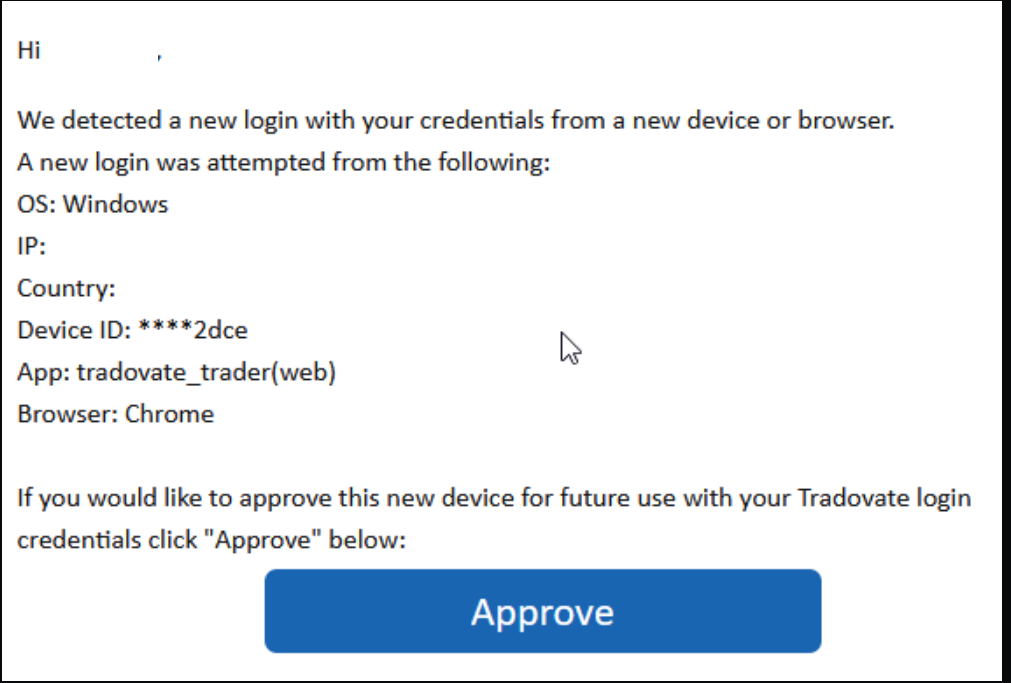
This is the cause most people miss. Because Tradovate treats the deviceId as part of its two-factor authentication, a new device has to be confirmed out-of-band. You'll get an email to approve the device ID, and until you approve it on live, it keeps denying access. No approval click, no live access, period.
4. You carried demo's accountId or accountSpec into live
Your live and demo accounts don't share the same numeric accountId, and the accountSpec string differs too (a live spec versus a DEMO-prefixed one). Reuse the demo values against the live host and you'll get the same Access is denied, even after the device is trusted.
5. The API key lacks order-write access
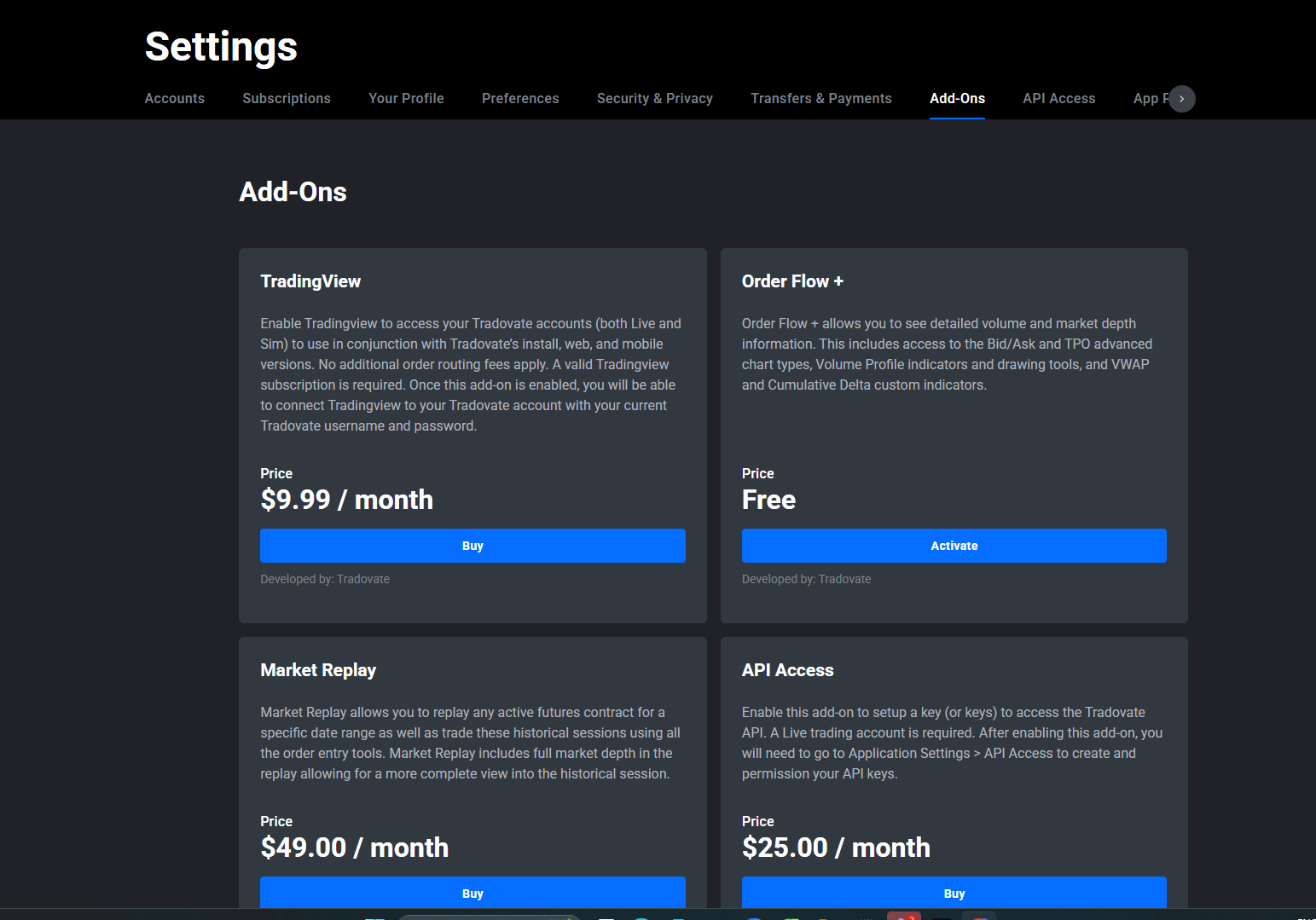
If the key or app was provisioned for read-only or market-data scope, live order placement gets denied. The key needs full order (write) entitlement, which comes through Tradovate's API Access add-on and app configuration.
How to Fix the Live 401: Step-by-Step
Fixing a missing or non-permanent deviceId
Generate one stable, UUID-style deviceId
Create one stable, UUID-style string for the machine that runs your bot, for example 71986488-882c-43db-c345-92a0a2ed9329. Strict UUID formatting matters less than the value being unique and unchanging; up to 64 characters is allowed.
Store it, don't regenerate it
Store it as a constant, a config file, an environment variable, or a secrets store. Never randomize it per run.
Send it on every login
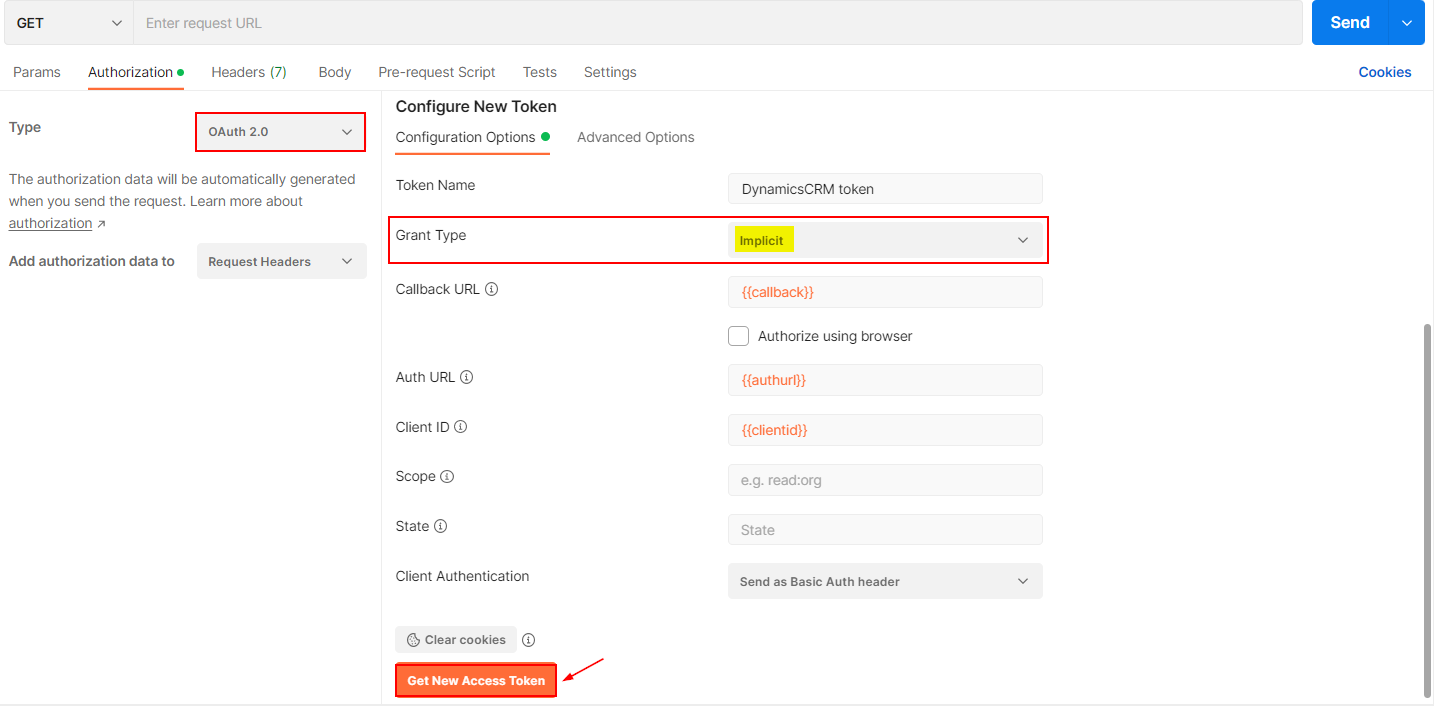
Include it in the access-token request body alongside your other credential fields, name, password, appId, appVersion, cid, sec, and deviceId, and reuse the exact same string on every subsequent login from that device.
Approving the device via the emailed link
Watch your inbox after the first live attempt
After your first live authentication attempt with a new deviceId, watch the inbox tied to your Tradovate account for a device-approval message.
Check spam, junk, and promotions
Check spam, junk, and promotions folders, the approval email gets filtered constantly.
Confirm the approval link
Open the email and confirm the approval link. That's what flips the device from “unknown” to “trusted” on the live environment.
Re-run live authentication
Re-run your live authentication. Orders that were returning Access is denied should now route.
Switching the host and re-pulling live account values
Point the base URL at live
Change your base URL to https://live.tradovateapi.com/v1 for every request once you're live.
Request a fresh live access token
Request a fresh live access token from the live host.
Re-pull the live accountId
Call /account/list with that live token and read the real numeric accountId back from the response.
Set the live accountSpec
Set accountSpec to the value shown for the live account (the live-format spec, not the DEMO-prefixed one) and use the matching accountId in your order body.
Confirming API Access entitlement
Open API Access settings
Log in to the Tradovate web platform and open the settings area that governs API Access / connected applications.
Verify full order permissions
Verify the API Access add-on is enabled and that your app has full order permissions, not read-only.
Think twice before disabling 2FA
If you disabled two-factor authentication as a shortcut, know the trade-off: turning 2FA off avoids the per-device email step, but it weakens account security and isn't worth it on a funded live account. Approving the device once is the safer path.
Troubleshooting Table
| Error / symptom | Meaning | Fix |
|---|---|---|
| 401 Access is denied on live only | Device not verified/approved on live | Send a permanent deviceId and confirm the emailed device-approval link |
| 200 with failureReason: UnknownReason, failureText: Access is denied | Auth succeeded but the device/session isn't trusted for live orders | Approve the device via email; reuse the same deviceId every login |
| Works in demo, fails in live with identical code | Only the host/URL differs | Switch base URL to https://live.tradovateapi.com/v1 |
| Access is denied after device is approved | Demo accountId/accountSpec reused on live | Re-pull live accountId from /account/list; set the live accountSpec |
| Every login prompts a new approval email | deviceId is being regenerated each run | Persist one stable deviceId string and reuse it |
| Read requests work, order placement denied | API key lacks order-write scope | Enable the API Access add-on and grant full order permissions |
Where PickMyTrade Fits
If you'd rather trade your TradingView signals live without hand-rolling device IDs, approval emails, and endpoint swaps, PickMyTrade handles the broker handshake for you:
- Managed live connection the device-trust and endpoint handling that trips up raw API integrations happens behind the scenes, so live orders route the first time.
- Entitlement & risk filters respects your account's data-agreement state and prop-firm limits before an order is ever sent.
- Rate-limit-safe routing spaces out order flow so authentication and order calls don't bounce.
- Multi-account sync mirrors the same signal across multiple Tradovate accounts without maintaining a separate device handshake per bot.
Skip the Device-Approval Dance
PickMyTrade manages the live Tradovate handshake for you, so your TradingView signals route the first time, no deviceId or approval emails required.
Start Your Free 7-Day TrialFrequently Asked Questions
Demo doesn't enforce device verification; live does. Live needs a permanent, approved deviceId plus the correct live host, accountId, and accountSpec. Code that fails only on live is the classic signature of a device-approval gap.
It's a string of up to 64 characters that permanently identifies the machine sending requests. A UUID-style value such as 71986488-882c-43db-c345-92a0a2ed9329 works well. What matters most is that it's unique to the device and reused unchanged on every login.
Check spam, junk, and promotions folders first, since the approval message is often filtered. Confirm the email address on your Tradovate account is correct, retry the live authentication to trigger a fresh email, and click the approval link when it arrives.
Some traders do, because it removes the per-device email step, but it materially weakens the security of a funded live account. Approving the device once is safer and only has to be done per new machine.
No. A token-expiry 401 shows up after roughly 90 minutes when your access token lapses, and you fix it by renewing the token. The device-approval 401 hits on your very first live request and is fixed by trusting the device.
You can reuse one deviceId per physical device across accounts, but every distinct device you authenticate from has to be approved on live. Running many bots from many machines means approving each machine once.
The most common remaining cause is stale demo values: reusing the demo accountId or accountSpec against the live host. Re-pull the live accountId from /account/list and set the correct live accountSpec.
You supply the deviceId in your authentication request. The Tradovate web app also exposes device and API details in its API and connection settings, so you can review approved devices there.
This guide is for educational and informational purposes only and is not financial, investment, or trading advice. Trading futures and other leveraged products carries a substantial risk of loss and is not suitable for every investor. PickMyTrade is an independent third-party automation platform and is not affiliated with, endorsed by, or sponsored by Tradovate, Inc. All related names, logos, and trademarks are the property of their respective owners. Platform features and steps change over time, so always confirm the current process in the official Tradovate platform and documentation before acting.