
Tradovate Bracket Order Only Fills 1 Contract
You built a multi-contract bracket, the entry hit, and only one contract showed up. Here's why Tradovate does that, and the exact fix for each cause.
On This Page
- What “Only 1 Contract Filled” Actually Means
- Top Causes of a Bracket Filling Only 1 Contract
- 1. The Order-Entry Quantity Is Smaller Than the Total Bracket
- 2. ATM Strategy Target Legs Don't Sum to Your Intended Size
- 3. A Limit Exit Partially Filled From Thin Liquidity
- 4. An Orphaned Target or Stop Was Left Working After a Stop-Out
- 5. Interface or Connectivity Glitches on a Single Leg
- How to Fix a Bracket That Only Fills 1 Contract, Step by Step
- Fixing the Quantity Mismatch (Causes 1 and 2)
- Fixing Partial Fills on Limit Exits (Cause 3)
- Clearing an Orphaned Leg After a Stop-Out (Cause 4)
- Troubleshooting Table
- Where PickMyTrade Fits
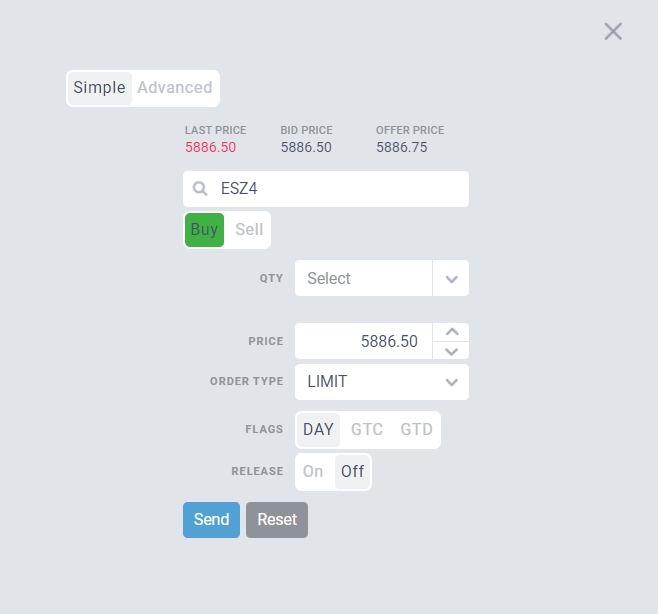
You line up a clean multi-contract trade on ES or NQ, drop a bracket with a stop and a target, watch the entry hit, and only one contract fills. The rest of your size never enters. Or worse: your stop covers one lot while a second contract sits naked in the market. In fast futures, a Tradovate bracket that only fills 1 contract is one of the most expensive “small” bugs there is. You either miss the profit you planned for, or you carry an unhedged position you thought was protected.
Here's the reassuring part: in the overwhelming majority of cases this isn't a broker fault. It's a quantity mismatch between your order-entry size and the total contracts defined in your bracket. Two other variants, a thin-liquidity partial fill on a limit exit, and an orphaned target or stop left working after a stop-out, round out the picture. This guide walks through every cause, the exact fix for each, and how automation like PickMyTrade prevents the mismatch before the order ever leaves your hands.
Quick Checklist
- Order quantity must equal the total bracket size. If your bracket has legs totaling 3 contracts, the buy/sell quantity has to be 3, not 1.
- Sum every ATM target leg. A 2+1 two-target strategy needs an entry quantity of 3, not the largest single leg.
- Use market or stop-market exits for guaranteed size. Limit targets can partially fill when liquidity at your price is thin.
- Check the Filled Orders tab. Tradovate breaks partial fills into multiple rows, so you can confirm whether 1 of 2 actually filled.
- Hunt for orphaned legs after a stop-out. If OCO didn't cancel the opposite order, a stray target can fill later and open a new position.
- Flatten and re-check the Orders panel if anything looks inconsistent before you add more size.
What “Only 1 Contract Filled” Actually Means
When a bracket behaves this way, one of two very different things has happened. Either not all of your contracts entered, an entry-quantity problem, or all contracts entered but only part of an exit filled, a partial-fill or OCO problem. On the surface they look the same: you end up holding, or exiting, fewer contracts than you intended. But the fix is opposite in each case.
The common one, by a wide margin, is the first. The number in your order-entry quantity field didn't match the total number of contracts spread across your bracket's legs. Tradovate submits exactly the quantity you tell it to. If your ATM strategy or manual bracket describes three contracts' worth of exits but you send an entry for one, only one contract enters, and only the bracket leg covering that single contract goes live. Everything you saw drawn on the chart beforehand was a preview of the full strategy, not a promise that one contract of entry size would trigger all of it.
The second scenario is a genuine market event. Your full size entered, but a limit exit only matched against the size available at your exact price. The remainder stays working, or price runs away and one contract is left exposed.
Top Causes of a Bracket Filling Only 1 Contract
1. The Order-Entry Quantity Is Smaller Than the Total Bracket
This is the root cause you'll hit most often. You build a bracket or ATM strategy with multiple target legs, say Target 1 for two contracts and Target 2 for one contract, three contracts in total, but leave the buy/sell quantity set to 1. Only one contract enters, and only the first bracket leg attaches to it. The rule to burn into memory: the quantity number at the top, next to the buy and sell buttons, has to equal the total number of contracts in your bracket order.
2. ATM Strategy Target Legs Don't Sum to Your Intended Size
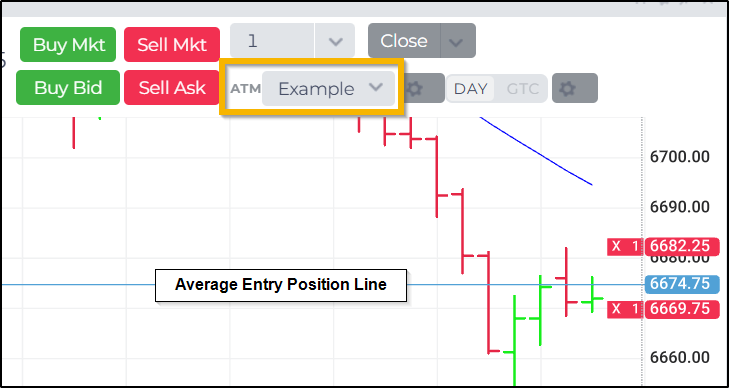
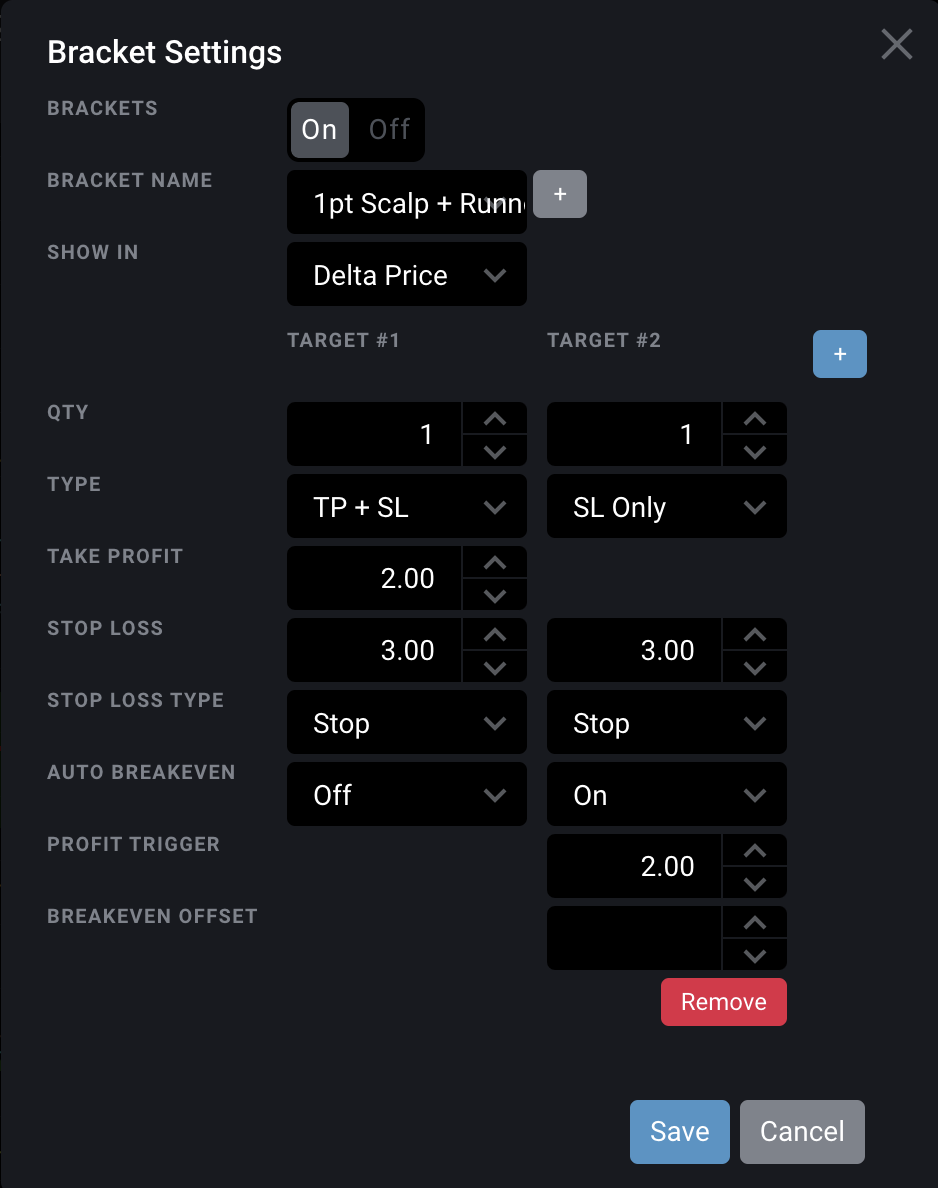
An ATM strategy in Tradovate lets each Stop Loss / Profit Target pair carry its own quantity, so you can scale out, for example two contracts at the first target and two at a further target, sharing one stop. That flexibility is exactly where the miscount creeps in. The strategy's total quantity is the sum of every leg, and your entry quantity has to equal that sum for all legs to arm. If the legs add up to four but you send two, half your plan simply doesn't exist.
3. A Limit Exit Partially Filled From Thin Liquidity
If your full position entered but a limit target only filled one of several contracts, the market, not the platform, is usually to blame. A limit order fills only against the size resting at your exact price. When there aren't enough contracts available there before price moves away, you get a partial fill: one lot done, the rest still working. Tradovate records each partial as its own row in the Filled Orders tab, which is the fastest way to confirm this is what happened.
4. An Orphaned Target or Stop Was Left Working After a Stop-Out
Bracket exits are linked as OCO, One Cancels the Other. When the stop fills, the target should cancel automatically, and vice versa. During a data hiccup, an outage, or a heavily modified bracket, that cancellation can fail and leave a lone working order behind. If a leftover target later fills, it opens a new one-contract position you never intended, which reads exactly like a “bracket only filled one contract” event on your P&L.
5. Interface or Connectivity Glitches on a Single Leg
Less common, but real: a leg can get dropped or modified by a UI or connection glitch, especially when you edit brackets rapidly mid-trade. If your quantities are provably correct and liquidity was deep, capture the Orders and Filled Orders tabs and report it to Tradovate support, but rule out causes 1 through 4 first, because they explain the vast majority of these.
How to Fix a Bracket That Only Fills 1 Contract, Step by Step
Fixing the Quantity Mismatch (Causes 1 and 2)
Add up every leg's quantity
Open your bracket or ATM strategy and add up the quantity on every leg, every target and its paired stop.
Set the entry quantity to that total
Set the order-entry quantity (next to the buy/sell buttons) to that total before you submit.
Confirm your saved ATM strategy's legs
If you use a saved ATM strategy, confirm the strategy's leg quantities are what you expect, then match the entry quantity to their sum.
Check the Orders panel
Submit and immediately check the Orders panel. You should see one working order per leg, with quantities that add back up to your entry size.
Fixing Partial Fills on Limit Exits (Cause 3)
Switch to a stop-market or market exit
If guaranteed exit size matters more than price, use a stop-market or market exit rather than a resting limit, market orders fill your full size at the best available price.
Or accept the remainder on a limit target
If you keep a limit target, accept that thin books can leave a remainder, and be ready to manage the unfilled contract manually.
Review the Filled Orders tab
Review the Filled Orders tab to see exactly how many contracts filled, and at what prices, before adding more size.
Clearing an Orphaned Leg After a Stop-Out (Cause 4)
Check the Orders panel after every stop-out
After any stop-out or manual exit, glance at the Orders panel for a still-working target or stop that should have cancelled.
Cancel the orphaned leg by hand
Cancel any orphaned leg by hand so it can't fill later and open an unwanted position.
Use Flatten when in doubt
When in doubt, use Flatten to close positions and cancel all working orders for that contract at once, then rebuild the trade cleanly.
Keep in mind that specific position and order-quantity caps vary by firm and account size. Evaluation and funded prop accounts often enforce a maximum contract limit that can also block or truncate size. Check your firm's current rules if your bracket size is being capped rather than mismatched.
Troubleshooting Table
| Symptom | Meaning | Fix |
|---|---|---|
| Only 1 contract enters on a multi-leg bracket | Order-entry quantity is less than the bracket total | Set buy/sell quantity = sum of all bracket legs |
| ATM strategy fills fewer contracts than planned | Target legs sum higher than the entry quantity | Match entry quantity to the sum of every ATM leg |
| Limit target fills 1 of several, rest stays working | Partial fill, not enough liquidity at your price | Use stop-market/market exit, or manage the remainder |
| Extra contract appears after a stop-out | Orphaned OCO leg didn't auto-cancel and filled later | Cancel stray working orders; use Flatten to reset |
| One leg vanishes after rapid bracket edits | Possible UI/connection glitch on a single leg | Verify quantities, capture screenshots, contact support |
| Max contract limit truncates your size | Risk/position cap (varies by firm and account size) | Reduce size or request a limit change from your firm |
Where PickMyTrade Fits
Most one-contract bracket failures trace back to a quantity that was wrong before the order left your hands. PickMyTrade links your TradingView alerts straight to Tradovate and enforces the sizing for you, so the entry and its bracket always agree:
- Qty / Symbol Validation the alert defines the size once, so the entry and every bracket leg carry matching quantities instead of a hand-typed number that's easy to under-set.
- Entitlement & Risk Filters respects prop-firm position caps and data-agreement state, so oversized brackets are caught before they're rejected or truncated.
- Rate-Limit-Safe Routing spaces out order flow so bracket legs aren't dropped by rapid-fire modifications during volatile bars.
- Multi-Account Sync mirrors the corrected, full-size bracket across every connected account so no account is left holding a lone contract.
Stop Sizing Brackets by Hand
PickMyTrade lets your TradingView alert define the size once, so the entry and every bracket leg always match. Start your free 7-day trial and trade rejection-free.
Start Your Free 7-Day TrialFrequently Asked Questions
Almost always because the order-entry quantity was smaller than the total contracts described by your bracket. Tradovate sends exactly the quantity you enter, so if the field says 1 but your legs total 3, only one contract enters.
Yes. The ATM strategy defines how contracts are split across targets, but the entry quantity you submit must equal the sum of those legs. If it's lower, only part of the strategy arms.
No. That's usually a partial fill: a limit exit matched only the size available at your exact price. Check the Filled Orders tab and you'll see the fill split into separate rows.
Use a stop-market or market exit instead of a resting limit. Market orders fill your entire size at the best available price, at the cost of not controlling the exact fill price.
An orphaned bracket leg likely failed to cancel under OCO and filled later. After any stop-out, check the Orders panel and cancel any target or stop still working.
The large majority of cases are a quantity mismatch or a normal partial fill, both of which come down to configuration or market conditions rather than a defect. Genuine glitches happen but are rarer, so rule out the common causes first.
They can. Evaluation and funded accounts enforce maximum position sizes that vary by firm and account size, which may cap or truncate your bracket. Check your firm's current rules if the size limit, not a mismatch, is the problem.
Let the alert define the size once and route it through a bridge so the entry and all bracket legs always share the same quantity, removing the manual-typing step where the mismatch usually starts.
This guide is for educational and informational purposes only and is not financial, investment, or trading advice. Trading futures and other leveraged products carries a substantial risk of loss and is not suitable for every investor. PickMyTrade is an independent third-party automation platform and is not affiliated with, endorsed by, or sponsored by Tradovate, Inc. All related names, logos, and trademarks are the property of their respective owners. Platform features and steps change over time, so always confirm the current process in the official platform documentation before acting.