
Tradovate Charged for Order Flow Add-On Unwanted
An Order Flow+ line item showed up on your Tradovate statement and you don't remember signing up for it. Here's why the charge appears, how to turn the add-on off, and how to get a refund.
On This Page
- What the Order Flow Charge Actually Is
- Why You're Seeing the Charge
- 1. The add-on is switched on for your account
- 2. The tools got repackaged after the ownership change
- 3. You're paying separately for something your plan now includes
- 4. You subscribed once and forgot, and it renews on a full cycle
- 5. It's a prop or evaluation account, and the firm controls add-ons
- How to Stop and Dispute the Charge: Step-by-Step
- Troubleshooting Table
- Where PickMyTrade Fits
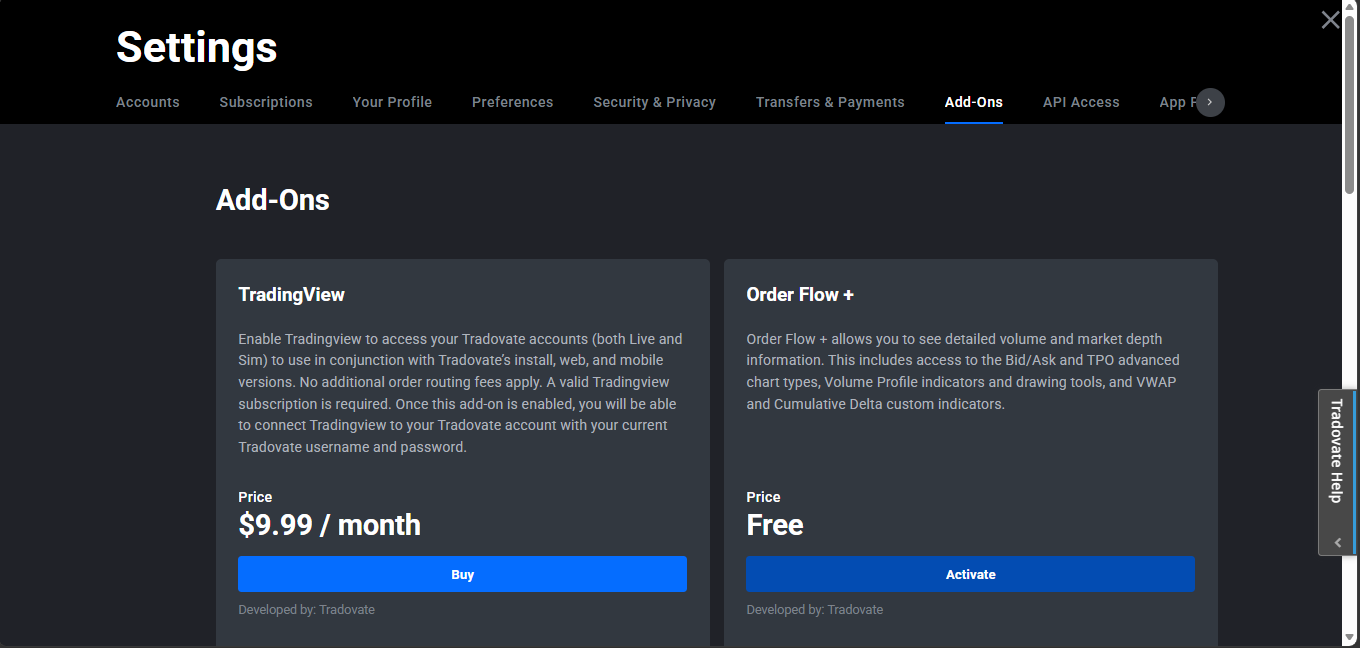
You open your Tradovate statement, and there it is: an Order Flow or Order Flow + line item you don't remember agreeing to. You're not imagining it, and it isn't a random glitch. Order Flow+ is a paid tools package, and if it's switched on for your account it renews on its own until you stop it. The short version of the fix: open your Add-Ons settings and turn Order Flow+ off so it stops renewing, then contact Tradovate billing with your statement to dispute the charge you didn't intend to make and ask for a credit. And here's the part that catches a lot of people off guard, on newer account plans these same tools are bundled in for free, so in plenty of cases you shouldn't be paying for them separately at all.
Add-on pricing, billing cycles and menu labels change over time. The steps below reflect how Tradovate's Add-Ons and billing worked at the time of writing, but Tradovate can revise fees and rename screens at any point. Always confirm the current wording and amounts in your own account before acting.
Quick Checklist for the Order Flow Charge
- Is Order Flow+ actually active? Open Application Settings › Add-Ons and look for Order Flow+. If it shows as subscribed, that's your line item.
- Does your plan already include it? Newer plans with a live brokerage account bundle the order-flow tools in, paying the standalone add-on on top of that is money wasted.
- Turn it off first. Switch the add-on off before anything else so it can't renew for another cycle.
- Then dispute the charge. Contact Tradovate billing with your statement and the dates, explain you didn't intend to subscribe, and ask for a refund or credit.
- Using NinjaTrader too? One entitlement under your Tradovate username covers both, don't subscribe a second time and pay twice.
- On a prop / evaluation account? Add-ons there are handled by your firm, not by you. Contact the firm, not Tradovate retail billing.
What the Order Flow Charge Actually Is
Order Flow+ is Tradovate's premium package of order-flow analysis tools. It bundles the visual, tape-reading features that active futures traders lean on: volumetric (footprint) bars, a volume profile indicator and drawing tool, cumulative delta, VWAP, a trade detector, and a market depth map. These aren't part of the basic charting everyone gets, they're a distinct, chargeable set of tools, which is why they show up as their own line on a statement.
The reason this surprises so many people comes down to history. Tradovate was acquired by NinjaTrader, and in the platform changes that followed, the order-flow tooling was consolidated into the paid Order Flow+ add-on. Accounts that once had those tools available, or that opted in during a promotion or trial, ended up carrying a recurring subscription. Nobody sat down and deliberately signed up for a monthly fee, the tools simply got repackaged behind one.
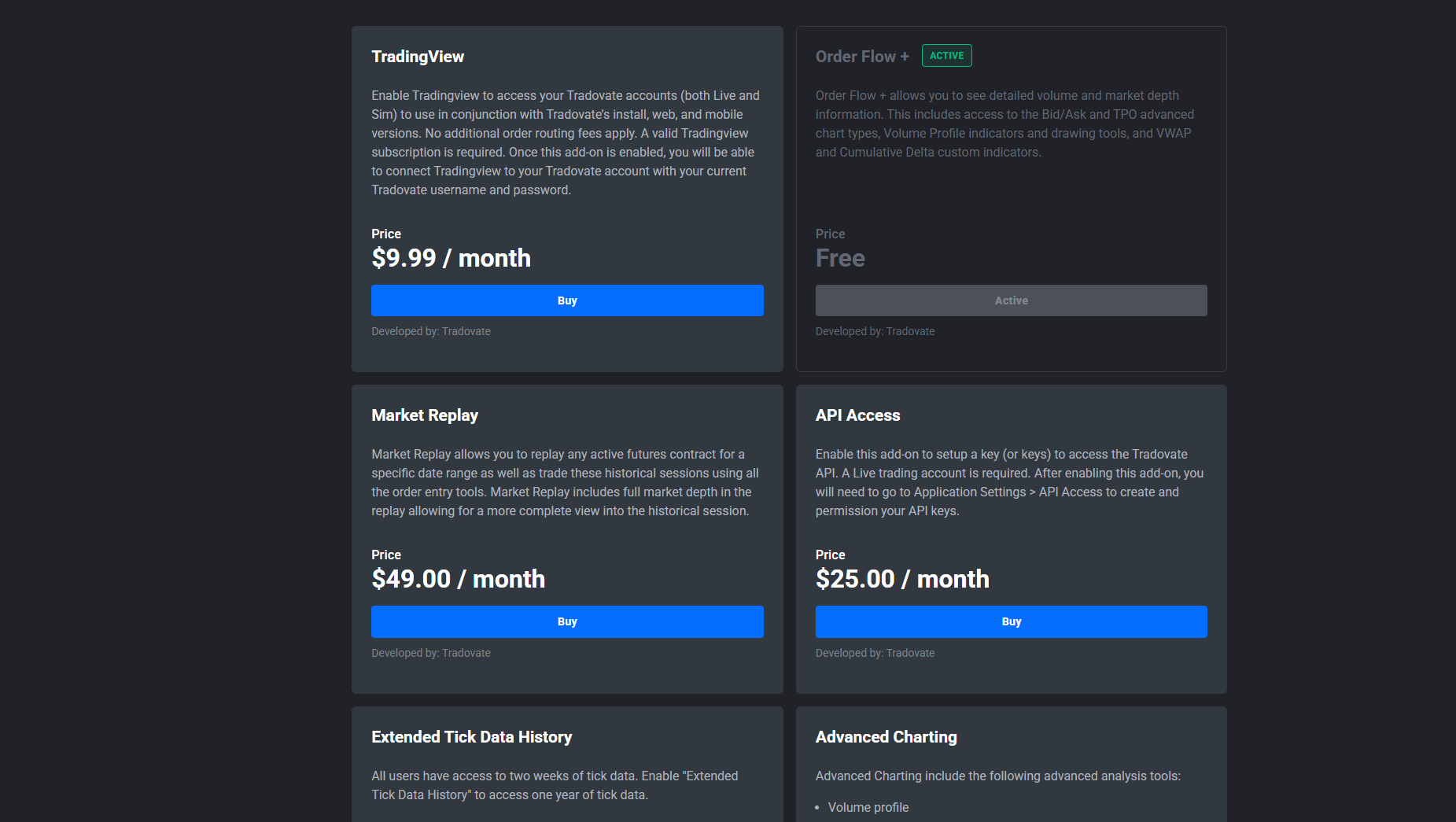
There's a twist that works in your favor, though. More recent account plans that come with a live Tradovate brokerage account now include the Order Flow+ tools at no additional charge, alongside things like market replay and TradingView access. So the same features that used to be a paid extra are, for many current plans, already baked in. That's what makes an ongoing standalone Order Flow+ charge worth a second look: you may be paying for something your plan now hands you for free.
Why You're Seeing the Charge
1. The add-on is switched on for your account
The most direct cause: Order Flow+ is enabled in your Add-Ons, so it bills every cycle. It may have been turned on during onboarding, in a free-trial window that quietly converted to paid, or at a time when the tools were sold as an extra. Whatever the origin, an active add-on keeps charging until someone switches it off.
2. The tools got repackaged after the ownership change
Following the NinjaTrader acquisition, the order-flow features were reorganized into the paid Order Flow+ product. If your account predates that change, tools you used to treat as “just part of the platform” may now sit behind a subscription. The charge feels new because the packaging is new, not because you did anything wrong.
3. You're paying separately for something your plan now includes
This is the one that genuinely costs people money. If you're on a current plan that bundles Order Flow+ and you still have the standalone add-on active, you can be billed twice for the same tools. Confirming what your plan already covers is often the single biggest saving here.
4. You subscribed once and forgot, and it renews on a full cycle
Add-ons don't quietly expire. Once active, Order Flow+ renews on its billing cycle, typically a full calendar month rather than a per-day proration, so a one-time “let me try this” click keeps charging month after month until you cancel it.
5. It's a prop or evaluation account, and the firm controls add-ons
On prop-firm evaluation and funded accounts, market-data tools and add-ons are provisioned and billed by the firm, not self-subscribed through Tradovate's retail settings. If order-flow charges show up on that kind of account, the firm, not Tradovate retail billing, is who you talk to. What's included and what costs extra varies by firm and account size, so check your firm's current rules.
How to Stop and Dispute the Charge: Step-by-Step
Confirm exactly what you're being billed for
Before disputing anything, pin down the charge. Open your billing or subscription history and identify the Order Flow+ line, the amount, and the date it posts each cycle. Knowing precisely what renews, and when, makes both the cancellation and any refund request cleaner.
Log in to the Tradovate web platform. Open your account's billing, membership, or subscription history. Locate the Order Flow+ entry and note its amount and renewal date. Screenshot or save it, you'll want this if you ask for a refund.
Turn the add-on off so it stops renewing
Cancelling stops the bleeding. Do this before you contact anyone, so the charge can't roll into another cycle while you wait on a reply.
In the web platform, open Application Settings from the upper-right corner of the screen. Open the Add-Ons tab. Find Order Flow+ in the list. Switch it off / unsubscribe so it won't renew next cycle. Confirm the change is saved and the add-on now reads as inactive.
One thing to know: because add-ons usually bill for the whole calendar month, you may keep access to the tools through the end of the current cycle and simply not be charged again afterward. That's normal, it doesn't mean the cancellation failed.
Check whether your plan already includes the tools
While you're in settings, look at your plan. If you're on a current plan that bundles Order Flow+ with a live brokerage account, you don't need the paid add-on at all, keeping it active just duplicates a benefit you already have. If you're on an older or free tier, weigh whether the tools are worth a plan change versus a standalone fee.
Contact billing to dispute the charge and ask for a refund
Turning the add-on off stops future charges, but it doesn't automatically reverse ones you've already paid. For those, you have to ask, and refunds are decided case by case, so how you ask matters.
Reach Tradovate billing through in-app live chat or the official Contact Support page. State clearly that you were billed for Order Flow+ that you didn't intend to subscribe to. Attach the statement or screenshot from Step 1 with the amounts and dates. If your plan already includes the tools, say so, a duplicate charge is a strong basis for a credit. Ask directly for a refund or account credit, and note that you've already cancelled the add-on.
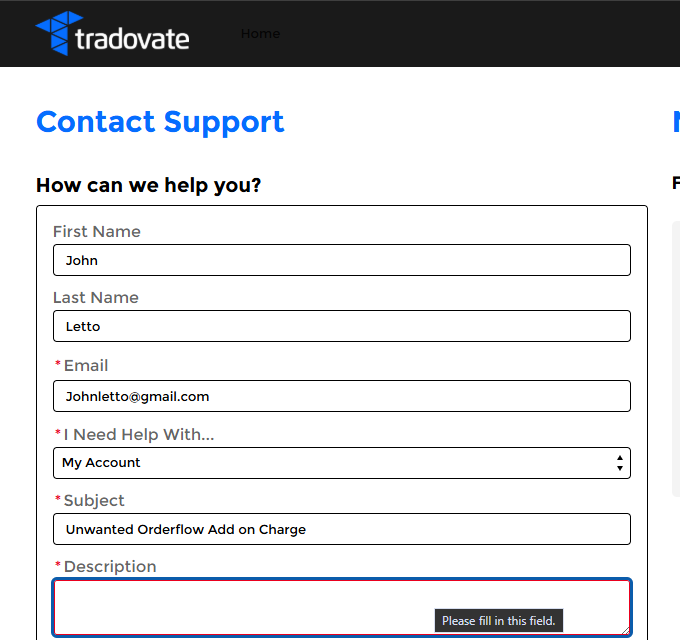
Keep it factual and specific. A message that names the exact charge, shows the dates, and explains why it wasn't intended is far more persuasive than a vague complaint. If it's a prop or evaluation account, send the same information to your firm's support instead.
Troubleshooting Table
| Symptom | What it means | Fix |
|---|---|---|
| “Order Flow +” line item on your statement | The paid Order Flow+ add-on is active and renewing | Turn it off in Application Settings › Add-Ons, then dispute past charges with billing |
| Charged even though you don't recall subscribing | Tools were repackaged into a paid add-on after the ownership change | Check the Add-Ons tab; unsubscribe and request a credit for charges you didn't intend |
| Paying the add-on but your plan lists Order Flow+ as included | Duplicate charge for a bundled benefit | Cancel the standalone add-on; use the plan-included tools instead |
| Cancelled, but still have access this month | Add-ons bill for the full cycle, not prorated | Normal, you keep access until cycle end and aren't billed again |
| Charged in both Tradovate and NinjaTrader | Subscribed twice under different logins | Use one entitlement under your Tradovate username; cancel the duplicate |
| Order-flow charge on a prop / evaluation account | Add-ons there are handled by the prop firm | Contact your firm's support; rules vary by firm and account size |
Where PickMyTrade Fits
Order-flow indicators are for reading the market by eye. If your edge is a defined, rule-based strategy, you may not need to stare at footprint bars at all, you need your signals to fire orders reliably. That's where automation replaces a lot of manual screen-watching:
- Hands-off execution, PickMyTrade routes your TradingView alerts straight to your Tradovate account, so entries and exits fire on your rules without you glued to the tape.
- Fewer paid extras to babysit, when a systematic strategy does the reading for you, you can be deliberate about which paid tools you actually keep.
- Multi-account sync, mirror the same strategy across several Tradovate accounts from one alert.
- Clean trade records, every automated fill is logged, which also makes reviewing statements and charges far easier.
Automate Your Tradovate Orders
Stop paying for tools you're not using to watch the tape. Let PickMyTrade route your TradingView signals straight to Tradovate.
Start Your Free 7-Day TrialFrequently Asked Questions
It's the subscription fee for Order Flow+, a paid tools package that adds footprint (volumetric) bars, volume profile, cumulative delta, VWAP and related order-flow indicators. If it's active on your account, it renews on its own billing cycle until you turn it off.
The order-flow tools were reorganized into a paid Order Flow+ package during the platform changes that followed the NinjaTrader acquisition. Accounts that had those tools switched on, or that opted in at some point, can carry the recurring charge even if you don't remember choosing it. Check your Add-Ons settings to see whether it's active.
Log in to the Tradovate web platform, open Application Settings from the upper-right corner, open the Add-Ons tab, find Order Flow+ and switch it off so it stops renewing. Confirm the exact wording in the current platform, since Tradovate updates these menus over time.
Refunds are handled case by case. Turn the add-on off first, then contact Tradovate billing through in-app chat or the Contact Support page with your statement and dates, explain that you didn't intend to subscribe, and ask for a credit or refund. There's no guarantee, but a clear, documented request is far more likely to succeed.
On newer account plans with a live brokerage account, the Order Flow+ tools are bundled in at no extra cost. If you're still being billed separately for the add-on, you may be paying twice, moving to or confirming the right plan can remove the standalone charge.
Add-on subscriptions generally bill for the full calendar month rather than prorating to the day you cancel, so you may keep access through the end of the current cycle and simply not be billed again after that. Confirm the current terms on your billing screen.
On evaluation and funded prop accounts, add-ons and market-data tools are handled by the prop firm rather than self-subscribed through Tradovate retail billing. Contact your firm's support to review or remove the charge. Rules and pricing vary by firm and account size, so check your firm's current terms.
You shouldn't need to pay twice. An Order Flow+ entitlement tied to your Tradovate username carries over when you sign in to NinjaTrader with that same username. Subscribing a second time under a different login is the usual way people end up double-paying.
This guide is for educational and informational purposes only and is not financial, investment, or trading advice. Trading futures and other leveraged products carries a substantial risk of loss and is not suitable for every investor. PickMyTrade is an independent third-party automation platform and is not affiliated with, endorsed by, or sponsored by Tradovate, Inc. “Tradovate” and all related names, logos, and trademarks are the property of their respective owners. Platform features and steps change over time, so always confirm the current process in the official Tradovate platform and documentation before acting.